







SolGuruz Logo
Pricing

Custom ERP Migration and Modernization Services

Your records move across intact, validated against source, with rollback tested before cutover.

ERP migration is the process of moving data, processes, and users from an existing system to a new one. The work covers source system assessment, schema mapping, data cleansing, dry runs, reconciliation, and cutover planning. Companies migrate when a platform loses vendor support, stops fitting the process, or costs more to maintain than to replace. ERP modernization is the alternative when the system holds the right logic in the wrong technology.
Request a Quote
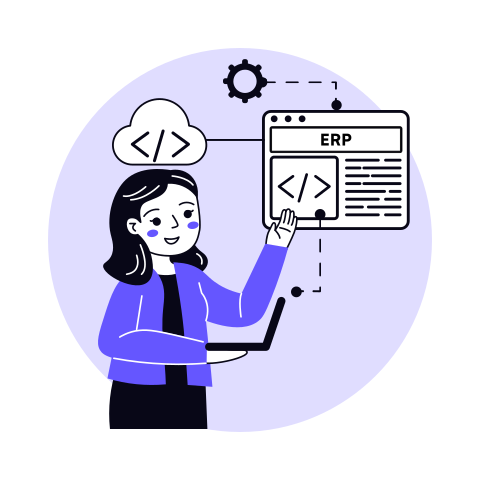
Illustration of a developer with a laptop pointing at an ERP application window, linked by dashed lines to a cloud code icon and a settings gear
  • Two-person team icon for flexible engagement modelsFlexible Engagement Models
  • Locked document icon for a strict NDAStrict NDA
  • Calendar icon for the one-week risk-free trial1 Week Risk Free Trial

The Engineering Partner You Can Build On

A migration is judged on whether every record lands where it should, so the team running it has to own the detail through cutover. Here is the track record behind ours.

7+

Years Building Custom Software

102+

Products Delivered Across Apps, Web & Software

80%

Repeat Client Rate

87+

Clients Served Across 17+ Countries

Trusted by Startups and Enterprises Worldwide

success speaks louder

Watch How We Make a Difference

Frame 01 / 04

Custom Software Solution Development / Driver Dashboard & Invoice Automation for Food Service Company

SolGuruz has delivered a solution that has reduced 90% of manual efforts through automation and provided real-time insights for supplier fulfillment and order volume trends. The team is responsive to requests and changes, and their proactive approach to problem-solving has stood out.

Summarized from Gary Boyd's Clutch review

Gary Boyd

CEO and Owner, Tasty Food Guys | Florida, USA

Read Clutch Verified Review
Tasty Food Guys

SolGuruz is Rated by Real People on Google and Clutch

SolGuruz Google Reviews
5.0

Rated 5.0 / 5 on Google by clients, partners, and visitors who have experienced SolGuruz first-hand - through our work, our office, or our team.

Read Google reviews →
SolGuruz Clutch Reviews
4.9

4.9 / 5 on Clutch - independently audited reviews from real clients who have shipped products with SolGuruz.

Read Clutch Reviews →

Backed by independent accreditations

WHEN TO MOVE

Signals It Is Time to Migrate Your ERP

Migration projects usually start for one of a few reasons. Six come up most often.

01

Vendor support is ending

Platforms reach end of life, and once support stops, security patches and compliance updates stop with them. The decision date is set by the vendor rather than by you, which makes this the most time-sensitive trigger on the list.

02

Maintenance costs keep climbing

Older systems need specialist knowledge that gets harder to hire. A growing share of the IT budget goes to keeping the current system running, with less left for anything that moves the business forward.

03

The system cannot scale with the business

More users, more sites, or more transaction volume push the platform past what it handles well. Performance degrades at exactly the point the business is growing fastest.

04

Reporting cannot answer the questions you have

Finance and operations pull data manually because the reporting layer was built for a different era. Decisions wait on someone assembling a view by hand.

05

Compliance requirements have moved past what the system supports

Audit trails, access controls, and data residency rules change. A platform that met the standard five years ago may not meet it now, and retrofitting compliance into an old system costs more than it saves.

06

The user experience is costing you adoption

New staff take months to learn an interface designed twenty years ago. Training costs go up and data quality goes down as people avoid the parts they find difficult.

One of these is worth a review. If two or three apply at once, it is time to plan the move instead of waiting for the system to force it. Our ERP migration services start by checking which of these apply to you.

Find out if staying put is costing you more

Tell us what you run today, and we'll tell you whether to move now or wait.

YOUR OPTIONS

Rehost, Upgrade, Migrate, Modernize, or Replace

Five routes, from a straight rehost to full ERP modernization or replacement, each with very different amounts of work. We'll decide which one fits during the assessment.

Cloud with sync arrows representing a rehost

Rehost

We move the hosting environment and leave the application alone. Your configuration and interface stay exactly as they are. Often the right first step when the system works and the infrastructure is the constraint, and we will tell you if your assessment points there.

Device with refresh arrows representing an upgrade

Upgrade

An ERP upgrade keeps you on the same platform and moves you to a newer version. Worth doing when the system still fits and the vendor still supports it. The risk sits in customizations, since heavily modified installations often break on upgrade and the work to fix them can exceed the upgrade itself.

Connected API chip representing a platform migration

Migrate

You move to a different platform or a different hosting environment, carrying your data and processes with you. This is the most common route when a vendor ends support or when on-premises infrastructure reaches its limit.

Legacy application windows representing ERP modernization

Modernize

ERP modernization rebuilds parts of the system while keeping what works. Older architecture gets replaced, interfaces get rebuilt, and integration capability gets added, usually in phases rather than all at once. Suited to systems that still hold the right logic in the wrong technology.

Monitor with a new ERP dashboard representing a replacement

Replace

ERP replacement starts from the process rather than the system. Worth considering when no amount of configuration closes the gap, and when the workarounds have become the process. Replacement also reopens the question of how much system you need, which our ERP vs MRP comparison covers.

The table sets out what each one actually involves.

RehostUpgradeMigrateModernizeReplace
What changesHosting environment onlyVersion, same platformPlatform or hostingArchitecture and capabilityEverything, including the process
What your users seeNo changeMinor interface changesFamiliar if like for likeRebuilt interfacesA new system
Data impactNone, moved as isUsually in placeFull mapping and transformationSchema often restructuredMapped to a new model
Typical triggerInfrastructure cost or availabilityVendor release or patchEnd of life or hosting limitPerformance or integration gapsFunctional gap too wide to close
Relative effortLowestLowModerateHighHighest

Most engagements turn out to be a combination. A finance module gets replaced while inventory is migrated as is, and the decision gets made per module during assessment.

WHERE YOU START

ERP Migration From Spreadsheets, Legacy ERP Systems, and Unsupported Platforms

The starting point shapes the work more than the destination does. Four situations cover most migrations.

Monitor with spreadsheet charts representing spreadsheet and accounting data

From spreadsheets and accounting software

Finance runs in accounting software, operations run in spreadsheets, and nobody holds a single version of the record. Migration here is partly construction, since much of what the new system needs has never existed in structured form. Expect the mapping phase to run longer than the move itself, because historical data has to be reconciled before it can be imported at all.

Older application windows representing a legacy on-premises ERP

From a legacy on-premises ERP

Often built in-house years ago and maintained by developers who have since moved on. The logic is sound and the business depends on it daily, but a growing share of the IT budget goes to keeping it running. The constraint is usually documentation rather than data, and reconstructing what each field means takes real time.

Warning sign representing ending vendor support

From a platform losing vendor support

The decision date comes from outside, which changes the planning. Security patches stop, compliance certifications lapse, and third-party integrations start failing as partners move on. Working backward from the end-of-life date usually leaves less room than teams expect, especially where a parallel run is needed.

Document under a magnifying glass representing a process gap review

From an ERP that no longer fits the process

The system works and the vendor supports it, but the business has moved. Teams run spreadsheets alongside it, approvals happen in email, and reporting gets assembled by hand. Migration here is mostly a scoping question, since the gap between what the system does and what the business needs has to be documented before anything moves.

Each starting point carries a different risk profile, so assessment begins with the source system rather than with where you are heading.

Not sure what you are actually moving?

Describe your current setup and we will tell you what the migration would involve.

ERP Data Migration

Data is where migrations succeed or fail. Six stages take your records from the source system into the new one.

StageWhat happens
Source extraction and profilingRecords are pulled from the source and profiled for volume, duplication, completeness, and format inconsistency. Profiling comes first because it determines how much cleansing the project actually needs.
Schema mappingEvery field in the source gets mapped to a field in the destination, with transformation rules written for anything that does not match directly. Date formats, units of measure, currency handling, and code structures all get documented here.
Cleansing and deduplicationDuplicate records are merged, incomplete entries are completed or flagged, and inconsistent values are standardized against an agreed reference. Your team makes the calls on anything ambiguous.
Staging and validationMapped data loads into a staging environment and gets validated against source. Ledger balances, inventory counts, and open transactions reconcile separately, since each one fails differently.
Dry runA full migration runs end to end against production-scale data. Timing gets measured, failures get logged, and the cutover window becomes a known quantity.
Cutover and reconciliationThe live move runs to a documented runbook. Post-move reconciliation confirms every balance matches source before anyone transacts in the new system.

Rollback procedures are documented and tested during the dry run, so the fallback position is known before cutover, with the decision point and the owner already agreed. How thoroughly that rehearsal runs is what separates a clean cutover from a weekend of firefighting, and it is the core of our ERP data migration services.

Historical data gets a separate decision. Not everything needs to move into the live system, and archiving older records to a queryable store often costs less than carrying a decade of history into a platform priced on volume.

ERP Cloud Migration

Two decisions shape a cloud migration, and we settle both during assessment. The first is lift and shift or rearchitect: we assess your current system against both routes and cost them separately.

Lift and shiftRearchitect
What we moveYour system as it stands, onto cloud infrastructureCore lifted, specific modules rebuilt
What you getRunning sooner, lower upfront costElastic scaling and usage-based cost
Where it falls shortSame performance ceiling you have nowLonger timeline on the rebuilt modules

Most cloud ERP migration projects land between the two. We identify which modules justify the rebuild and which travel as they are.

What We Settle Before the Plan Is Signed

The second decision is what the cloud move commits you to. Three things get agreed before the plan is signed.

Secure folder with a lock representing data residency

Data residency

We confirm which records must stay in which jurisdiction, then select regions to match.

Money bag representing the cloud cost model

Cost model

We project your consumption cost against your current infrastructure spend, so the operating budget is known upfront.

Calendar representing archived history

History

We recommend what migrates live and what archives, since a decade of records carries a monthly cost in the cloud.

ERP migration to cloud is scoped alongside the migration plan, because hosting choice changes transformation design and cutover sequencing. Our cloud ERP migration guide walks through the strategies and effort in more detail.

Weighing cloud against staying put?

We cost both routes against your current infrastructure spend before you decide.

Migration Scope, Cost, and Timeline

Effort depends on where you are migrating from, not where you are going. We rate complexity during assessment and cost each migration type separately.

Migration typeComplexityTypical effort
Rehost, same applicationLow2 to 4 weeks
Spreadsheets and accounting software to a new systemMedium8 to 14 weeks
Like-for-like platform move, documented sourceMedium10 to 16 weeks
Legacy on-premises to cloudHigh16 to 24 weeks
Legacy with heavy customizationHigh20 to 32 weeks

Those ranges cover the migration itself. Standing up and configuring the destination system sits separately, and we break that down in our guide to ERP implementation cost.

What Moves the Effort

Six variables decide where your migration lands inside those bands, and an ERP migration checklist is only as useful as the assessment behind it.

API chip representing the source system interface

Source system interface

A documented API is a different job from a database with no schema documentation, and legacy systems with neither take the longest.

Charts and a database representing record volume and history

Record volume and history depth

Ten years of transactions reconcile differently from two, and the decision on what archives changes the number.

Code window with a gear representing customization depth

Customization depth

Every modification in the source system needs a decision. Rebuild it, drop it, or replace it with standard functionality.

Code window under a magnifying glass representing data quality checks

Data quality at source

Duplication and inconsistent entries add cleansing time. We profile this first, because it is the variable that moves estimates most.

Monitor with a gear representing connected systems

Connected systems

Every integration running against the old platform has to be rebuilt against the new one. We inventory these during assessment, since the count is often missed until cutover.

Stopwatch in hand representing a parallel run

Parallel run requirement

Running both systems through a full cycle adds weeks and cost, and it is the right call where the risk warrants it.

ERP migration strategy gets set against your source system rather than a template, so the estimate reflects what you actually have.

how we work

How We Run an ERP Migration

The ERP migration process runs across five phases, from source assessment to post-cutover reconciliation. SolGuruz uses documented field mapping, rehearsed cutovers, and AI-assisted analysis, so every record movement traces back to an agreed specification. The sequencing follows the same principles set out in our ERP implementation best practices guide, applied to migration specifically.

  1. 01 / 05

    Source System and Data Assessment

    We start with what you have. Every table, every field, every integration running against the current platform, plus the documentation that exists and the documentation that does not. Legacy systems often hold logic nobody has written down, so this phase includes sitting with the people who use it daily.

    Data gets profiled at the same time, covering volume, duplication, completeness, and format consistency. Complexity is rated here, so the effort estimate reflects your actual source rather than a category average.


    Tools: Claude, Postman, Whimsical AI, Notion, Otter AI

    Deliverables: Source system inventory, data profiling report, integration inventory, complexity rating, and a prioritized list of what archives.

    Illustration of a chart and magnifying glass for source system assessment
  2. 02 / 05

    Mapping and Transformation Design

    Every source field maps to a destination field, with transformation rules written for anything that does not match directly. Date formats, units of measure, currency handling, code structures, and customer or supplier hierarchies all get documented before any data moves.

    Decisions that need your input get flagged for your team to decide. Where two records conflict or a field has no clean destination, your team makes the call and we record the reasoning alongside the rule.


    Tools: Claude, Notion, Python, Whimsical AI

    Deliverables: Field mapping document, transformation rule set, exception log, and a signed-off data dictionary for the new system.

    Illustration of a design screen for mapping and transformation design
  3. 03 / 05

    Cleansing and Staging

    Duplicates get merged, incomplete records get completed or flagged, and inconsistent values get standardized against an agreed reference. Cleansing happens in a working copy, so your live system stays untouched throughout.

    Mapped data then loads into a staging environment that mirrors the destination. Validation runs against the source, with ledger balances, inventory counts, and open transactions reconciled separately because each one fails differently.


    Tools: Claude Code, Python, SonarQube, Notion, Ollama

    Deliverables: Cleansing report, staging load results, reconciliation by record type, and an exception list for your team to review.

    Illustration of a report with a pie chart for cleansing and staging
  4. 04 / 05

    Dry Run and Rollback Testing

    A full migration runs end to end against production-scale data. Timing gets measured so the cutover window becomes a known quantity, and every failure gets logged and resolved before the live move.

    Rollback gets tested in the same exercise. The decision point, the owner, and the recovery sequence are all documented and rehearsed, so the fallback position is already proven when cutover arrives.


    Tools: Claude Code, Python, Postman, SonarQube, Userback

    Deliverables: Dry run report, measured cutover window, resolved failure log, tested rollback procedure, and a cutover runbook.

    Illustration of a test board for dry run and rollback testing
  5. 05 / 05

    Cutover and Reconciliation

    The live move runs to the runbook, with owners and timings already agreed. Where the risk warrants it, the old system runs in parallel through a full reporting cycle before being retired.

    Post-move reconciliation confirms every balance matches source before anyone transacts in the new system. Support continues through the first full period close, covering issue resolution and the questions that only surface once people are working in the system.


    Tools: Claude Code, N8N Automation Agent, Zoho Projects, Userback, Ollama

    Deliverables: Executed cutover runbook, post-move reconciliation report, parallel run comparison where applicable, and SLA-backed support agreement.

    Illustration of connected screens for cutover and reconciliation

WHO DOES WHAT

How the Work Splits Between Our Team and Yours

Migration work can sit entirely with us or run alongside your own IT team. We agree the split before the plan is signed.

Consultant at a laptop representing the guided model

Guided

Keeps the work with your team and the method with ours. Useful where your people know the source system better than anyone external could, which is common with in-house legacy platforms.

Team around a gear representing the shared model

Shared

Where most mid-sized migrations land. Your team carries the parts that need institutional knowledge; we carry the parts that need migration-specific tooling.

Team lead with a team representing the full service model

Full service

Suits organizations without the internal bandwidth to absorb a migration alongside day-to-day operations, or where a vendor end-of-life date has removed the option of a slower pace.

Here is how each phase splits under the three models.

GuidedSharedFull service
Source assessmentWe run itWe run itWe run it
Field mappingWe design, your team validatesWe design and documentWe design and document
Data cleansingYour team, to our documented rulesSplit by record typeWe handle it
Staging and validationYour team, we reviewWe run it, your team signs offWe run it
Dry runJointWe run itWe run it
CutoverYour team leads, we supportJointWe lead
TrainingYour teamYour team, we provide materialsWe deliver it
Best suited toInternal IT with capacity and system knowledgeInternal IT stretched across other workNo internal capacity, or a tight deadline

The split can change mid-project. Teams often start guided and move to shared once they see how much of their week the cleansing actually takes.

Working out how much your team can absorb?

Tell us what capacity you have and we will shape the split around it.

WHERE YOU LAND

Platforms We Migrate To

Where you land shapes the work as much as where you are starting. Three destinations cover most migrations.

Monitor with an ERP dashboard representing a custom ERP

Custom ERP

A custom ERP is built around your process rather than configured into someone else's model. Worth considering when the migration is happening because the previous system never fit, or when licensing across sites has already passed what a custom ERP build would cost.
Puzzle pieces representing the Odoo platform

Odoo

Moving your data into the Odoo module structure, with custom module development where the standard apps do not reach. We handle the mapping, the configuration, and the connections to systems around it. Suited to operations needing real configuration without a system built from nothing.

Application windows representing a platform you have already selected

A platform you have already selected

Where the destination is decided, we handle the migration itself. Source assessment, mapping, cleansing, dry run, and cutover, independent of who implements the new system. Useful when your implementation partner covers configuration but not the data.

ALONGSIDE THE MOVE

ERP Services That Run Alongside Migration

Work that sits either side of a migration, or runs with it.

You are hereERP Migration Services
  • Custom ERP DevelopmentGround-up ERP builds shaped around your workflows and module set. Worth considering when the migration is happening because the current system never fit the process.
  • ERP Consulting ServicesAssessment, requirements definition, and a costed comparison of your options before the migration route is chosen. You keep the documentation whichever way the numbers point.
  • ERP Implementation ServicesConfiguration, rollout, and go-live on the destination system. Runs alongside migration when the new platform needs setting up as well as populating.
  • ERP Integration ServicesRebuilding the connections that ran against your old platform. Every integration pointing at the source system needs reconnecting to the new one.
  • Hire ERP DevelopersEngineers with migration experience working inside your team. They work to your delivery process, your security requirements, and your reporting lines.
  • ERP Support and MaintenanceMonitoring, issue resolution, and enhancement planning once the new system is live. The first full period close after cutover is where most questions surface.

ERP Migration by Industry

What makes a migration difficult changes with the operation. Six sectors where the work carries sector-specific risk.

  • Gear and user card representing manufacturing

    Manufacturing

    Bills of materials, routings, and open work orders all have to land accurately, since a wrong component quantity propagates into every job that uses it. Work-in-progress balances at cutover need reconciling separately from finished goods.

  • Open box with a gear representing wholesale distribution

    Wholesale Distribution

    Multi-warehouse stock counts must reconcile exactly before anyone picks against the new system. Customer-specific pricing and contract terms carry across as rules, not as flat values, which is where migrations commonly lose accuracy.

  • Keys with a house tag representing construction

    Construction

    Open jobs migrate mid-project, so costs to date, committed materials, and retainage all have to tie back to the old system. Progress billing has to reconcile across the cutover boundary for any job spanning it.

  • Shopping cart with money representing food and beverage

    Food and Beverage

    Lot and batch records carry recall obligations, so traceability cannot break at the migration point. Expiry dates and shelf-life calculations need validating against the source before anything ships from the new system.

  • Secure folder representing healthcare records

    Healthcare

    Access controls and audit trails must be rebuilt to the standard your operation reports against, and the migration itself has to be auditable. Supply and asset records reconcile facility by facility.

  • Money bag representing financial services

    Financial Services

    Ledger history, reconciliation rules, and regulatory reporting formats all need to survive intact. Period closes before and after cutover have to produce matching figures for the same range.

Sector shapes cutover risk more than record volume does, which is why validation is designed around what your industry cannot afford to get wrong.

Technologies We Migrate Across

Migration work depends on what the source system exposes. These are the layers we work across, and where no interface exists, we build one.

Why Businesses Choose SolGuruz for ERP Migration

Choosing who moves your records comes down to what gets rehearsed before the live cutover. Here is how ours runs.

  • A Senior Architect Signs Off Every Mapping

    Every field mapping and conversion rule gets reviewed by a senior architect before data moves. Mistakes get caught on paper, not in your live system.
  • Backed by a 90+ Person Team

    Your project draws on a 90+ person team covering data engineering, QA, and cloud. Specialists join for the phase that needs them, so you are not paying for idle time.
  • Proof From Live ERP Data Work

    We built inventory sync between client ERPs and a B2B trading portal running across web, mobile, and cloud. The same discipline applies when your records move.
  • Reports Your Finance Team Can Check

    You get a reconciliation report for every record type, showing totals before and after the move. Finance can verify the numbers without asking us.
  • Your Team Ready Before Go-Live

    Users train on the new system with your own migrated data before switch-over day. The first week goes to work, not learning.
  • Rated 4.9 on Clutch, ISO 27001 Certified

    Independent client reviews and an independently certified security standard cover how your operational history is handled during the move.
Know what it takes before you commit

Source assessment, effort rating, and a figure against your own records.

Book a call to scope an ERP migration with SolGuruz

What Our Clients Say

Explore the latest reviews from our existing clients to get a better picture of our services and collaboration.

Clutch Fall Champion 2024
Clutch Global Award Fall 2024
Top Clutch Nextjs Developer 2023 Award
Most Reviewed App Development Company
Top App Development Company on appFutura
Food & Beverage

Web & Mobile App Dev for Online Food and Grocery Platform

SolGuruz successfully delivered a reliable and robust system with an easy operating experience. The team fulfilled all the client's expectations and delivered the project on time. Their active involvement in the project and effective communication via virtual meetings were hallmarks of their work.

Kastriot Shatri review for SolGuruz

Summarized from Kastriot Shatri's Clutch review

Kastriot Shatri, CEO, Kas Foods Solution Group Kft

Budapest, HungaryBudapest, Hungary

Sep. 2023 - Mar. 2025
Diamond & Jewelry

Custom Software Development, Design and App Development for B2B Diamond Platform

Since partnering with SolGuruz, the client has gained an all-encompassing solution to provide their customers. The team accomplishes their goals with agility, and internal stakeholders are particularly impressed with the vendor's comprehensive approach to support and maintenance.

Kalpesh review for SolGuruz

Summarized from Kalpesh Zalavadiya's Clutch review

Kalpesh Zalavadiya, Managing Director, DiamNow

IndiaSurat, India

Nov. 2021 - Ongoing
Education

Web and Mobile App Development for Language Education Platform

SolGuruz delivers a fully functional app and website within the agreed timeline and budget. The team follows a clear workflow with defined milestones, making it easy to track the project's progress. They are also responsive to the client's needs and provide professional suggestions.

Iman Alsharhan review for SolGuruz

Summarized from Iman Alsharhan's Clutch review

Iman Alsharhan, Founder, TirTir World

KuwaitKuwait

Sep. 2025 - Ongoing
Real estate

Web Design, Mobile App Development of Real Estate Platform for Real Estate Company

SolGuruz has delivered a functional, error-free platform that aligns with the client's needs and requirements, meeting expectations. They ensure a smooth process through their effective communication, responsiveness, proactive problem-solving, and streamlined, transparent development process.

Chirag Balani

Summarized from Chirag Balani's Clutch review

Chirag Balani, General Manager, Property Dollar

AustraliaSydney, Australia

Oct. 2021 - Ongoing
Artificial Intelligence

AI Development for Consultancy Firm

SolGuruz successfully delivered the project on time, meeting the client's expectations. The team demonstrated strong technical skills and efficient communication through virtual meetings and email updates. Their flexibility and value for money were also commendable.

Matt Kuperholz review for SolGuruz

Summarized from Matt Kuperholz's Clutch review

Matt Kuperholz, AI Scientist & Advisor, Matt Kuperholz Consultancy

AustraliaMelbourne, Australia

Jun. 2026 - Jul. 2026
Media

Custom Software Dev for Digital Media Distribution Company

SolGuruz delivered the project in a timely manner that met the client's expectations. The service provider ensured excellent communication via email and virtual meetings. Their accommodating and empathetic approach was impeccable.

Samir Khandwala review for SolGuruz

Summarized from Samir Khandwala's Clutch review

Samir Khandwala, CEO, iMusti, Inc.

UsaFremont, California, United States

Jul. 2022 - Sep. 2022

From Our Portfolio

Software Projects We Have Delivered for Businesses

SolGuruz has shipped 102+ products across 14 industries.

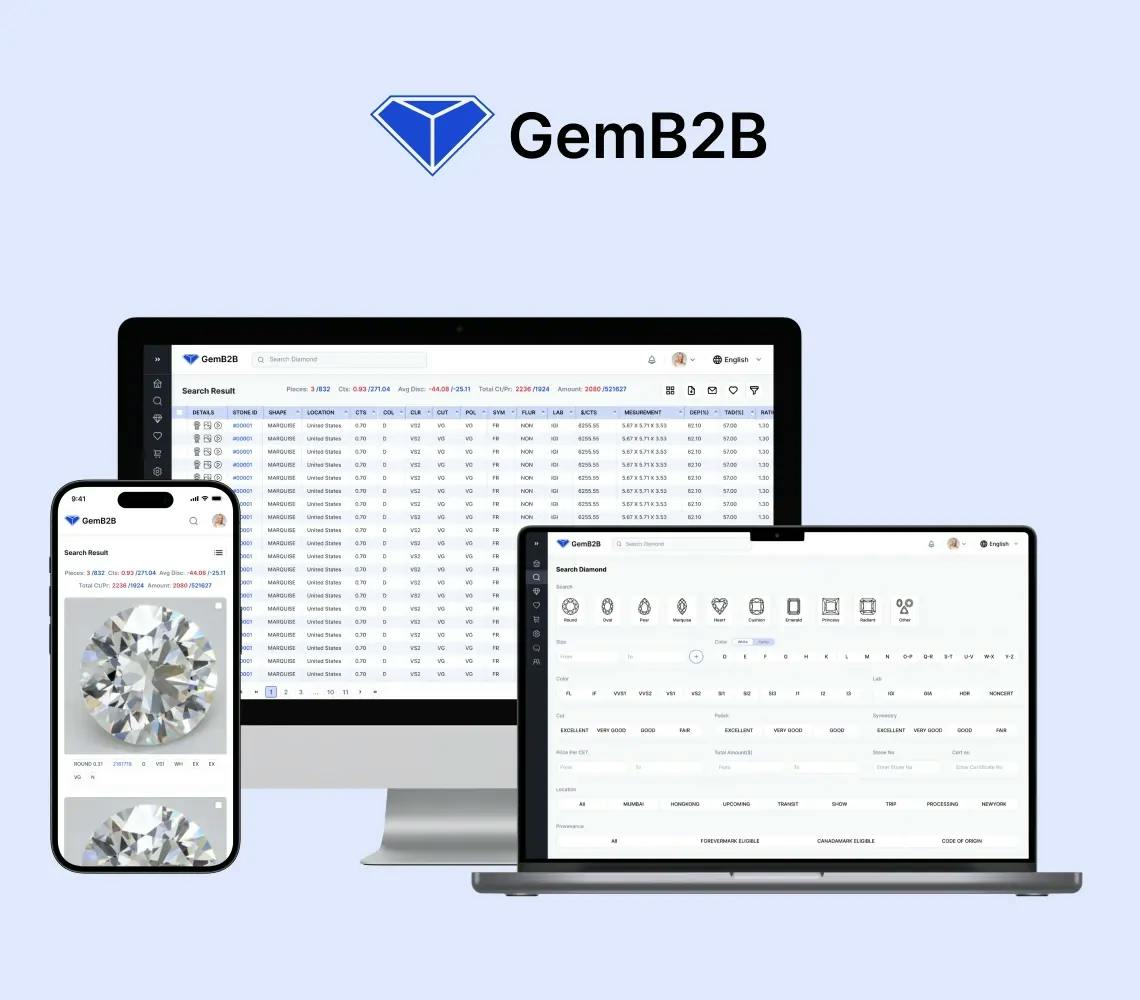
  • Diamond B2B Portal and Diamond CRM Development

    B2B Diamond CRM Portal With ERP Synchronisation

    Gem is a B2B diamond trading portal with inventory sync to client ERP systems, 4 platforms (web, mobile, backend, cloud), and enterprise security.

    Key Outcomes

    6+ Month
    Delivery Timeline
    4 Platforms
    Web, Mobile, Backend, Cloud
    ERP Sync
    Inventory Synced with Client ERP
    B2B
    Diamond Trading
  • HotelGuruz: CMMS Software Delivered in 45 Days - Live on App Store & Google Play

    HotelGuruz: CMMS Software Delivered in 45 Days - Live on App Store & Google Play

    HotelGuruz Redefines Hotel Operations with a CMMS Solution that Simplifies Maintenance, Asset Management, Reduces Costs & Unites Hotel Teams under One Centralized Platform.

    Key Outcomes

    45-Day
    Delivery Timeline
    $180-$350
    Saved Per Room / Year
    iOS + Android
    Native Apps
    Hospitality
    CMMS Platform
  • Property Management Software Solutions

    Property Management Software Solutions

    We built a custom property platform with CRM-style tenant management, maintenance requests, automated rent collection, and financial reporting across role-based panels.

    Key Outcomes

    12-14 Week
    Delivery Timeline
    15-20 hrs
    Rent Reconciliation Saved
    3 Portals
    Tenant, Landlord, Admin
    5 Layers
    Security: Encryption to Rollback

Get More Insights from SolGuruz Experts

View All Blogs

Frequently Asked Questions

Quick answers to the questions our clients and prospects ask most. If yours is not here, our team is one click away.

Jay Nandwana Technical Business Consultant at SolGuruz

Jay NandwanaSenior Technical Business Consultant

Need advice tailored to your project?

FAQs cover the common ground. For decisions specific to your tech stack, timeline, and team, talk to Jay and the team, who have shipped what you are planning.

ERP migration is the process of moving data, processes, and users from an existing system to a new one. The work covers source assessment, schema mapping, cleansing, dry runs, reconciliation, and cutover planning. It applies whether the destination is a packaged platform or a custom build.

Upgrade if the system still fits and the vendor still supports it. Migrate when support ends or infrastructure limits you. Replace when no amount of configuration closes the gap. Most engagements combine routes, decided per module during assessment.

A rehost takes 2 to 4 weeks. Moving from spreadsheets and accounting software takes 8 to 14 weeks, and a like-for-like move from a documented platform takes 10 to 16 weeks. Legacy on-premises to cloud takes 16 to 24 weeks, and legacy systems with heavy customization take 20 to 32 weeks.

Cost tracks with source interface, record volume, customization depth, data quality, connected systems, and whether a parallel run is needed. Each is rated during assessment, so the figure reflects your actual source system once the work is scoped.

Records are mapped, cleansed, and validated against the source before loading. Not everything has to move into the live system. Archiving older records to a queryable store often costs less than carrying a decade of history into a platform priced on volume.

Yes, where the risk warrants it. Both systems run through a full reporting cycle and the figures get compared before the old one retires. Parallel running adds weeks and cost, so we recommend it selectively rather than by default.

The migration itself typically runs 10 to 32 weeks depending on the source system, plus a parallel run if needed. Work backward from the end-of-life date and allow for assessment, mapping, cleansing, dry run, cutover, and that parallel run. Most teams find they have less room than expected, particularly where the source system is poorly documented.

Yes. That covers mapping your data into Odoo's module structure, custom module development where the standard apps do not reach, and reconnecting the systems around it. Configuration and migration run as one engagement, and our Odoo migration services cover the version-upgrade side as well.

You do. Field mapping documents, transformation rules, the data dictionary, and the cutover runbook all transfer to you in editable formats. Clients own their IP and code from day one, so the next migration starts from something.