SaaS App Development: A Step-by-Step Guide to Building, Launching, and Scaling Your Product
This guide walks you through the complete SaaS app development process, from validating your idea and picking the right tech stack to building an MVP, launching your product, and scaling it. Practical steps for founders and product teams.

Summarise with AI


Key takeaway
1. SaaS development requires both business validation and technical planning
Successful SaaS products start with validating a real market need, understanding willingness to pay, and designing a scalable architecture before writing code.
2. Building a focused MVP is critical for faster launches
Instead of developing dozens of features, launch a Minimum Viable Product with core functionality, gather user feedback, and iterate quickly.
3. Choosing the right tech stack and cloud infrastructure matters
Modern SaaS applications typically rely on scalable technologies like React, Node.js, and databases such as PostgreSQL, hosted on cloud platforms like Amazon Web Services or Google Cloud.
4. AI, integrations, and scalability are shaping the future of SaaS
Modern SaaS products increasingly use AI-powered automation, predictive analytics, and integrations with other platforms to deliver more value and stay competitive.
So you have a SaaS idea. It could be a project management tool built for a specific industry or a billing platform designed to solve a problem you personally struggled with for years. Turning that idea into a working SaaS product, however, is where most founders face their biggest challenge.
SaaS app development is not just about writing code. It is about validating an idea, choosing the right architecture, picking a tech stack that will not hold you back in two years, and launching something that real users want to pay for, month after month.
The Software-as-a-Service (SaaS) market continues to expand rapidly as businesses move more operations to the cloud. Industry reports estimate the global SaaS market reached around $408 billion in 2025, with projections pushing the market to over $435–$465 billion by 2026. Analysts also expect continued double-digit growth throughout the decade, with the market potentially exceeding $800 billion by 2030 as organizations accelerate digital transformation and adopt cloud-based platforms across departments.
We have put together this guide based on our hands-on experience as a SaaS application development partner for startups and growing businesses.
Let us walk through the full process, step by step.
TL;DR
Building a SaaS application requires validating your idea, choosing the right architecture and tech stack, launching a focused MVP, and continuously improving the product based on user feedback. With the SaaS market growing rapidly, businesses that combine scalable infrastructure, AI capabilities, and strong user experience can build successful and sustainable SaaS products.
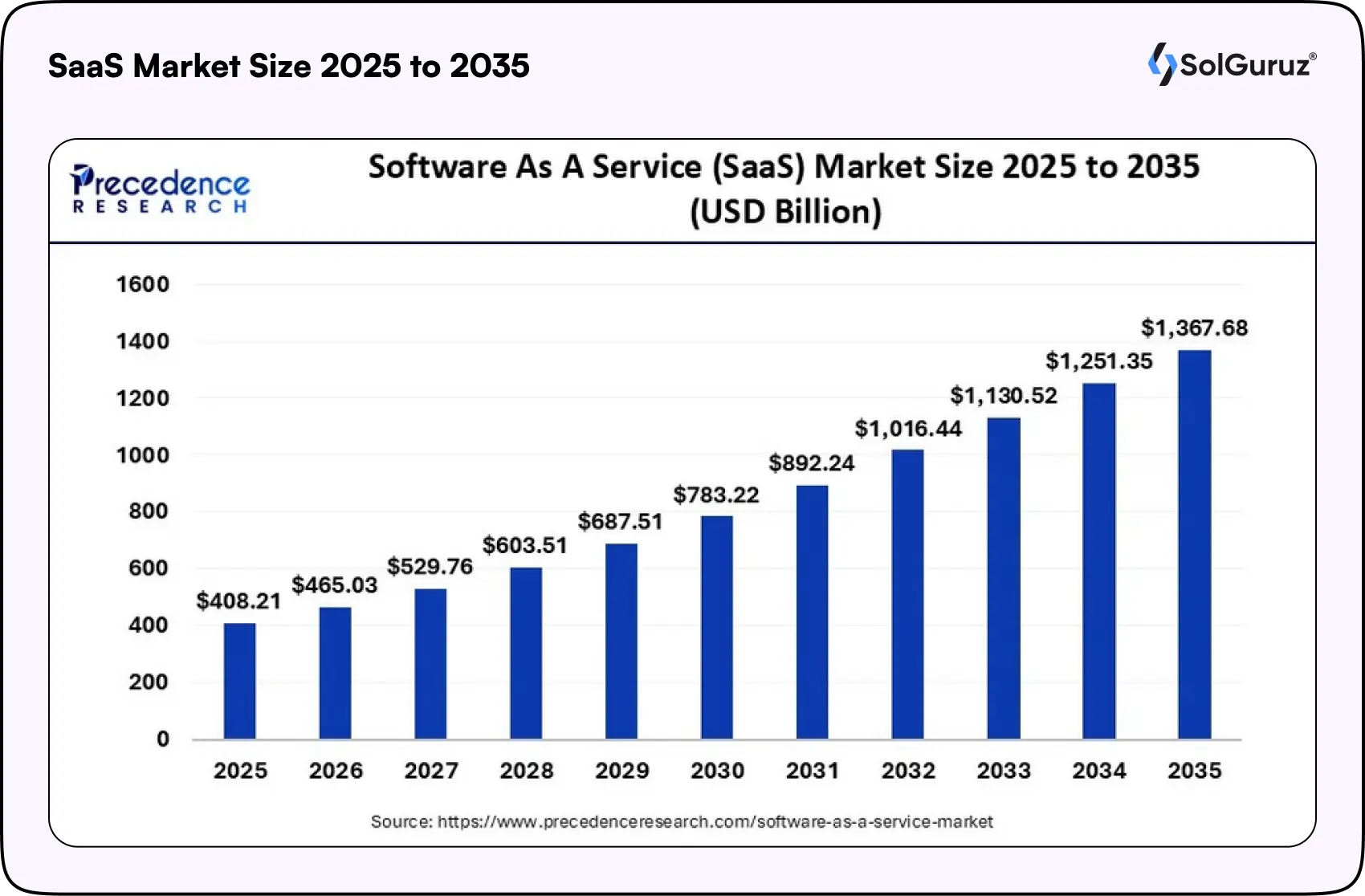
Table of Contents
What is SaaS App Development?
SaaS stands for Software-as-a-Service. Instead of installing software on individual computers or servers, users access the application through a web browser or mobile app. The provider hosts everything on the cloud. Users pay a subscription fee and get access to the software from anywhere, on any device.
Think of tools like Slack, HubSpot, or Notion. You do not download them and install them locally. You log in, and everything works. That is the SaaS model.
From a development perspective, SaaS app development means building software that is cloud-native, multi-tenant, subscription-ready, and designed for continuous updates. You are not shipping a product just once. You are building a living system that evolves every week.
SaaS vs. Traditional App Development
If you are wondering how SaaS development differs from building a traditional software product, here is a quick breakdown:
| Aspect | SaaS App Development | Traditional App Development |
| Hosting | Cloud servers (AWS, Azure, GCP) | Local servers or on-premise hardware |
| Deployment | Instant updates pushed to all users | Manual installation per device |
| Scalability | Add capacity on demand | Needs new hardware or licenses |
| Revenue Model | Recurring subscription income | One-time license purchase |
| Maintenance | Provider handles updates | Customer manages updates |
| Access | Any device with internet | Limited to installed devices |
| Cost Structure | Pay-as-you-go, low upfront | High upfront, ongoing maintenance |
| Security | Managed by a cloud provider with audits | Managed internally by the customer |
| Integrations | API-first design, connects to tools | Often requires custom dev work |
The core difference comes down to this: traditional software is a product you sell once. SaaS is a service you deliver continuously. That changes how you build, price, and grow.
Key Things to Consider Before Building a SaaS App
Before you jump into development, you need to answer some fundamental questions. These will shape every technical and business decision that follows.
1. Cloud Infrastructure
Your SaaS app will live in the cloud. That means choosing a provider like AWS, Google Cloud, or Microsoft Azure. The provider handles servers, networking, and uptime so you can focus on building features. But you need to think about where your users are located, which compliance standards you need (HIPAA, SOC 2, GDPR), and how much traffic you expect at launch versus in six months.
2. Multi-Tenancy
Most SaaS products use multi-tenant architecture. This means multiple customers share the same application instance, but their data stays completely isolated. It is more cost-effective and easier to maintain than single-tenant setups, where each customer gets their own instance.
For most startups and mid-stage products, multi-tenancy is the way to go. Single-tenant makes sense when you are dealing with enterprise clients who need strict data isolation for regulatory reasons.
3. Data Security
Security is not something you bolt on later. It needs to be part of your architecture from day one. At minimum, you should plan for encrypted data at rest and in transit, role-based access controls, regular security audits, automated backup systems with off-site storage, and compliance with industry-specific standards.
4. APIs and Integrations
Your SaaS product will not operate in a vacuum. It needs to connect with payment gateways, CRMs, marketing tools, analytics platforms, and more. Design your app with an API-first mindset. Build clean, well-documented RESTful or GraphQL APIs that make it simple for your product to communicate with external services and for your customers to integrate your tool into their workflows.
5. User Management
User registration, authentication, and authorization form the backbone of any SaaS product. You need a smooth signup process, secure login (ideally with SSO support), and a permissions system that controls who can access what. Tools like Auth0 or Firebase Authentication can handle a lot of this out of the box, but the logic around roles and permissions needs to be customized to your product.
Insight: Many SaaS products fail not because of bad ideas, but because of poor architectural planning. Investing time in infrastructure, security, and integrations early can save significant development effort later.
The SaaS App Development Process (Step by Step)
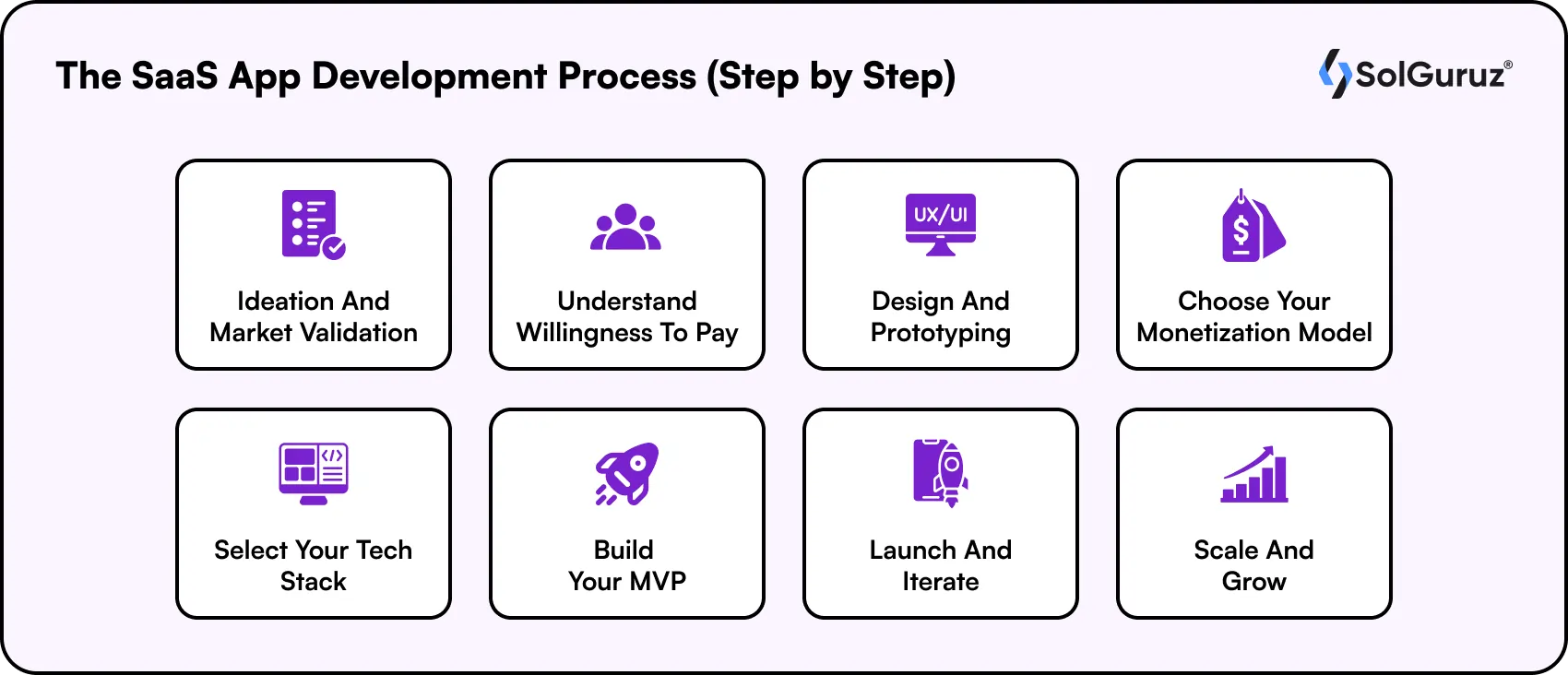
Here is where we get into the actual process of building a SaaS product. This is the framework we follow at SolGuruz when working with founders and product teams.
Step 1: Ideation and Market Validation
Every SaaS product begins with a problem worth solving, but a strong idea alone is not enough. You need to confirm that real users are willing to pay for the solution.
Start by identifying your target audience and understanding their biggest frustrations with current tools. Conduct user interviews, run surveys, and analyze competitors to find gaps in the market. Frameworks like the Value Proposition Canvas and Customer Journey Map can help align your product’s value with real user needs.
Step 2: Understand Willingness to Pay
This step is one that many founders skip. You might have a great product idea, but if your target audience cannot or will not pay for it, the economics do not work.
Research competitor pricing. Look at what similar tools charge and what pricing models they use. Talk to potential customers and ask directly: what would you pay for this? Understanding the price sensitivity of your market helps you choose the right monetization model later and forecast revenue accurately.
Step 3: Design and Prototyping
Once you have validated your idea, it is time to give it shape. Start with user flows that map out every screen and action a user takes. Sketch rough layouts. Then move into wireframes and clickable prototypes using tools like Figma.
The prototype does not need to be pixel-perfect. The goal is to get something tangible that you can test with real users before investing in full development. Gathering feedback at this stage saves you from expensive rework later.
Step 4: Choose Your Monetization Model
How will your SaaS product make money? There are several models to consider:
- Subscription-based pricing is the most common for SaaS. Users pay a fixed monthly or annual fee. This gives you predictable, recurring revenue.
- Usage-based pricing charges customers based on how much they use the product. Think of AWS billing or API call-based pricing.
- Freemium offers a free tier with limited features and charges for premium access. This is great for building a large user base quickly.
- Pay-per-feature lets users pick and pay for only the features they need.
In 2026, many SaaS products combine these models. A freemium base with usage-based upgrades is becoming a popular approach, especially for developer tools and API-driven products.
Step 5: Select Your Tech Stack
Your tech stack will shape how fast you can build, how well your product performs, and how easily you can scale later. Here are the most popular stacks for SaaS development in 2026. For a deeper dive, check out our guide on choosing a technology stack for app development.
Your tech stack determines how quickly you can build, scale, and maintain your SaaS product. For frontend development, frameworks like React, Next.js, and Vue.js are widely used for building responsive user interfaces.
On the backend, technologies such as Node.js, Django, and Ruby on Rails remain popular for scalable application development.
Most SaaS platforms rely on databases like PostgreSQL or MongoDB. They are hosted on cloud platforms such as Amazon Web Services, Microsoft Azure, or Google Cloud to ensure reliability and scalability.
Step 6: Build Your MVP
This is where development begins, but with a focused approach. Your Minimum Viable Product should include only the core features that solve the primary problem for your users. Nothing more. Read our detailed guide on SaaS MVP development for a deeper breakdown.
Focus on speed. The faster you get a working product in front of real users, the faster you learn what works and what does not. Feature creep is the number one killer of SaaS projects. Resist the temptation to build everything in v1.
At this stage, working with an experienced team makes a big difference. Whether you build in-house or hire mobile app developers through a partner like SolGuruz, the key is to have a team that understands SaaS architecture, not just app development.
Step 7: Launch, Gather Feedback, and Iterate
Launching your SaaS product is exciting, but the real work starts after launch. Set up systems for collecting user feedback from day one. Use tools like Hotjar for behavior tracking, Intercom for support conversations, and analytics dashboards to monitor key metrics.
The metrics that matter most at launch are Monthly Active Users (MAU), churn rate, customer acquisition cost (CAC), and feature adoption rates.
These numbers tell you whether your product is gaining traction or needs adjustment.
Plan for regular release cycles. A strong CI/CD pipeline lets you push updates and fixes without downtime. Your users should barely notice updates happening, but they should notice their experience getting better over time.
Step 8: Scale and Grow
Once you have product-market fit and steady user growth, it is time to scale. This means scaling your infrastructure (autoscaling cloud resources), expanding features based on user demand, introducing tiered pricing to capture different customer segments, and building integrations with popular tools in your users’ workflow.
Scaling too early is just as dangerous as scaling too late. Make sure your retention metrics are strong, and your unit economics are sound before pouring resources into growth.
Key Benefits of SaaS Application Development
SaaS has become one of the most popular software delivery models because it offers strong advantages for both businesses and users. Here are some of the key benefits of building a SaaS application.
1. Predictable Recurring Revenue
SaaS products typically operate on subscription-based pricing, which generates predictable monthly or annual revenue. This recurring income model helps businesses forecast growth and maintain stable cash flow.
2. High Scalability
SaaS applications are built on cloud infrastructure, allowing them to scale easily as the user base grows. Businesses can increase computing resources without rebuilding the entire system.
3. Lower Adoption Barriers for Customers
Users can access SaaS applications through a web browser without installing software or investing in expensive infrastructure. This makes it easier for customers to adopt and start using the product quickly.
4. Faster Product Updates
Since SaaS products are centrally hosted, developers can deploy updates and new features instantly for all users. This allows teams to fix issues quickly and continuously improve the product.
5. Global Accessibility
SaaS applications can be accessed from anywhere with an internet connection. This enables businesses to reach customers worldwide without physical distribution or regional installations.
6. Integration and Automation
SaaS platforms can easily integrate with other tools such as CRM systems, payment gateways, analytics platforms, and marketing tools, enabling workflow automation and improved operational efficiency.
Common Types of SaaS Applications
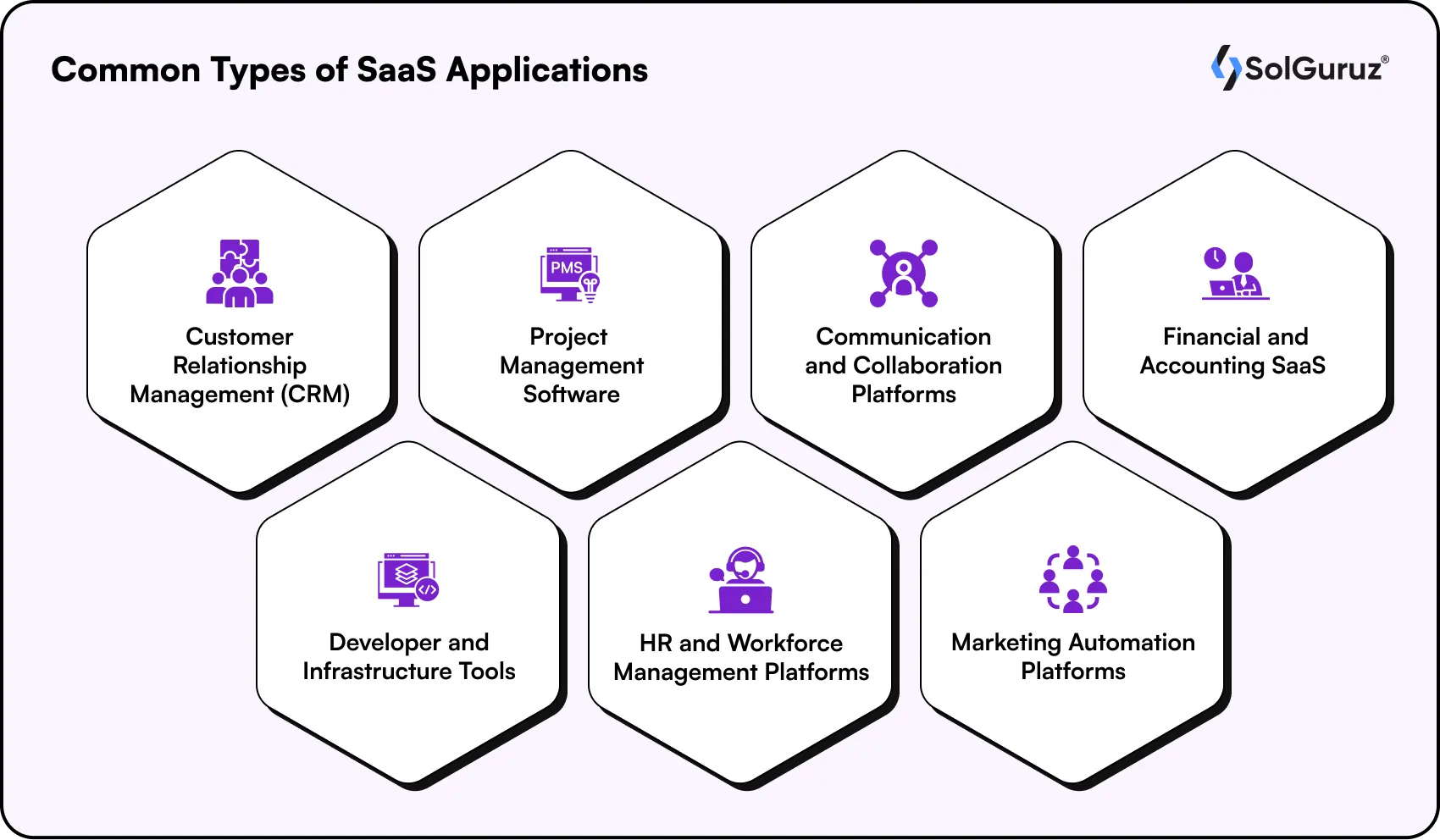
SaaS applications serve a wide range of business and operational needs across industries. While new products appear every year, most SaaS solutions fall into several core categories.
1. Customer Relationship Management (CRM)
CRM platforms help businesses manage customer interactions, track sales pipelines, and automate customer communication. Popular examples include Salesforce and HubSpot.
2. Project Management Software
Project management tools allow teams to organize tasks, monitor progress, and collaborate efficiently across projects. Platforms such as Asana and ClickUp are widely used by distributed teams.
3. Communication and Collaboration Platforms
These tools support real-time messaging, video meetings, and team collaboration in remote or hybrid workplaces. Examples include Slack and Microsoft Teams.
4 . Financial and Accounting SaaS
Finance-focused SaaS solutions help businesses manage invoicing, payroll, bookkeeping, and financial reporting. Tools like QuickBooks and Xero simplify accounting operations for companies of all sizes.
5. Developer and Infrastructure Tools
Developer-focused SaaS platforms provide tools for building, testing, and deploying applications. Popular platforms include GitHub and Postman. If you are planning to build a SaaS product, working with experienced developers is crucial. You can explore our guide to the top SaaS development companies to see which teams specialize in building scalable SaaS platforms.
6. HR and Workforce Management Platforms
HR SaaS tools streamline hiring, onboarding, payroll management, and employee engagement. Examples include BambooHR and Gusto.
7 . Marketing Automation Platforms
Marketing SaaS tools help businesses manage campaigns, automate email marketing, and track performance analytics. Solutions like Mailchimp and ActiveCampaign are widely used for digital marketing operations.
AI and SaaS Development in 2026
Artificial intelligence is rapidly becoming a core component of modern SaaS products. In 2026, many SaaS platforms are integrating AI capabilities to automate workflows, deliver personalized experiences, and help users make better decisions.
1. Automation of Repetitive Tasks
AI can automate routine processes such as categorizing expenses, routing customer support tickets, or processing large datasets. This reduces manual effort and improves operational efficiency.
2. Personalized User Experiences
AI-powered recommendation systems analyze user behavior to provide tailored suggestions, feature recommendations, or content personalization. Platforms like Netflix popularized this approach, and it is now widely adopted in SaaS products.
3 . Predictive Analytics
AI models help businesses anticipate trends and outcomes. For example, CRM systems can predict high-value leads, while project management tools can identify potential delays or risks.
4. AI-Powered Customer Support
Chatbots and virtual assistants can provide instant responses to common questions, improving customer support while reducing the workload on support teams.
Key Insight:
For SaaS founders, integrating AI is increasingly becoming a competitive advantage. Products that help users save time, reduce errors, or uncover valuable insights through AI are more likely to stand out in a crowded SaaS market.
How Much Does SaaS App Development Cost?
This is the question every founder asks, and the honest answer is: it depends. But we can give you realistic ranges based on our experience.
- A simple MVP with core features, basic UI, and a single integration typically costs between $15,000 and $50,000. Development time is 6 to 12 weeks.
- A mid-complexity SaaS product with multiple user roles, a dashboard, integrations with third-party tools, and a polished UI typically falls in the $50,000 to $150,000 range and takes 3 to 6 months to build.
- A full-scale enterprise SaaS platform with advanced features such as AI, complex workflows, multi-tenant architecture, compliance requirements, and a mobile app can range from $150,000 to $500,000 or more, with a development timeline of 6 to 12 months.
The biggest factors that affect cost are feature complexity, the number of integrations, design requirements, the tech stack choice, and whether you build in-house or work with a development partner.
Working with an experienced SaaS development company like SolGuruz can actually save you money in the long run by avoiding costly mistakes and rebuilds.
Common Mistakes to Avoid in SaaS Development
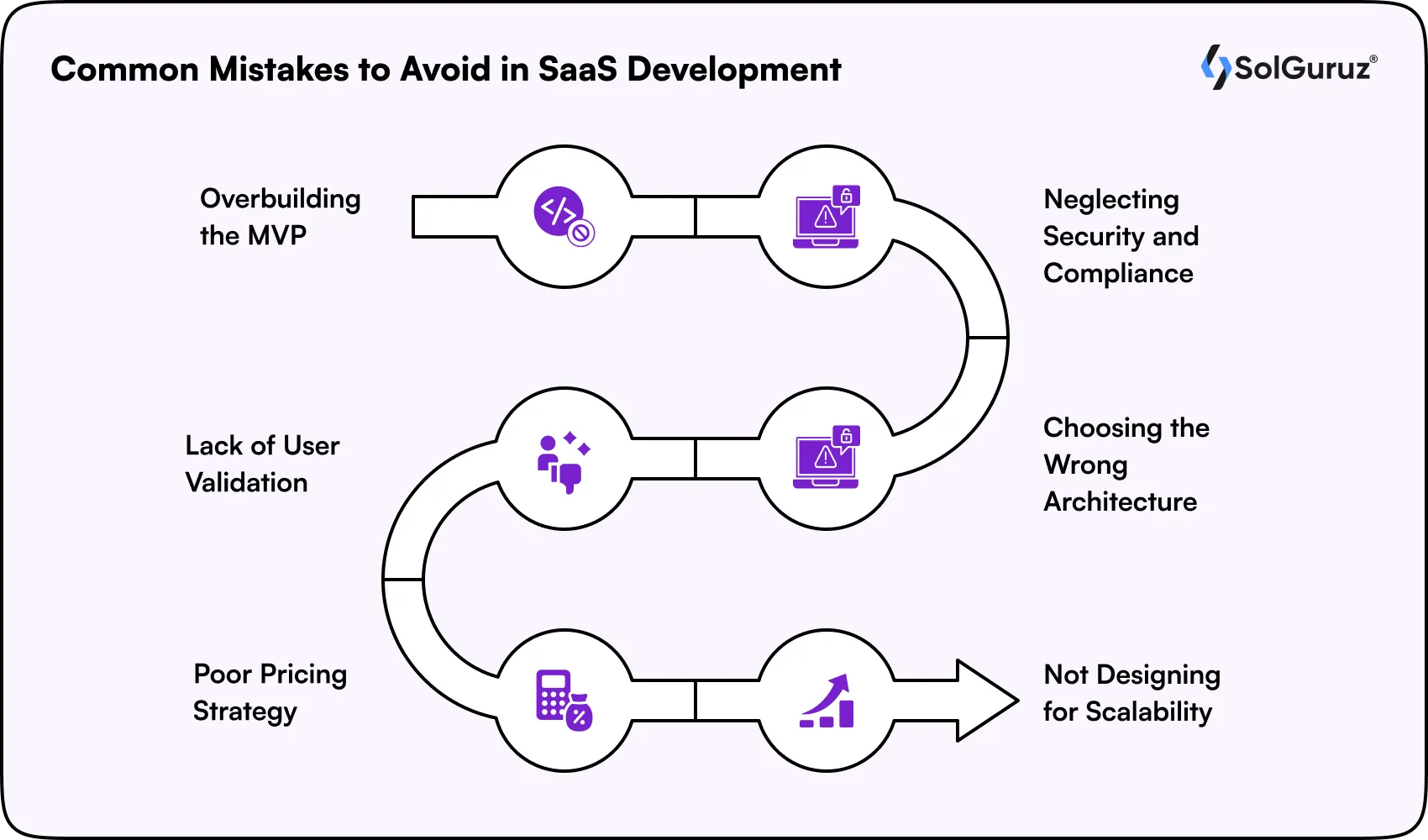
Building a successful SaaS product requires more than a good idea. Many startups face challenges because of avoidable development and strategy mistakes. Here are some of the most common pitfalls to watch out for:
1. Overbuilding the MVP
Trying to launch with too many features delays release and increases development costs. Focus on a small set of core features that solve the main problem and expand based on user feedback.
2 . Neglecting Security and Compliance
Security should be part of the architecture from the beginning. Implement data encryption, access controls, and compliance measures early to protect user data and maintain trust.
3. Choosing the Wrong Architecture
Selecting an unsuitable architecture, such as single-tenant when multi-tenant is more scalable, can lead to costly restructuring later.
4 . Lack of User Validation
Skipping user research often results in products that fail to meet real market needs. Regular feedback from potential users should guide product decisions.
5. Poor Pricing Strategy
Underpricing can limit growth and make it difficult to sustain operations. A well-researched pricing model should reflect the product’s value and market demand.
6 . Not Designing for Scalability
SaaS products should be built with future growth in mind. Scalable databases, APIs, and infrastructure help prevent performance issues as the user base grows.
Wrapping Up
SaaS app development is a process that combines business strategy with technical execution. It starts with validating a real problem, moves through architecture and tech stack decisions, and never truly ends because a good SaaS product keeps evolving.
The market is growing fast, the tools available are better than ever, and the barrier to launching a SaaS product is lower than ever. But that also means competition is fierce. The products that win are those built on solid foundations, with a clear understanding of their users and a team that knows how to iterate quickly.
If you are looking for a team that has been through this process many times and can help you build a SaaS product from scratch, talk to us at SolGuruz. We work with founders and product teams to go from idea to launch, and from launch to scale.
FAQs
1. What is the difference between SaaS and traditional software development?
SaaS products are hosted on the cloud and accessed through a browser or app. Users pay a subscription fee. Traditional software is installed locally, purchased upfront, and maintained by the customer. SaaS offers faster updates, lower upfront costs, and global access.
2. How long does it take to build a SaaS app?
An MVP typically takes 6 to 12 weeks. A mid-complexity product takes 3 to 6 months. A full enterprise platform can take 6 to 12 months or more, depending on feature complexity and integrations.
3. What tech stack is best for SaaS development?
The most popular stacks in 2026 include MERN (MongoDB, Express, React, and Node.js) for fast development and Python with Django for data-heavy applications. PostgreSQL is the go-to database for most SaaS products. The best choice depends on your product requirements and team expertise.
4. How much does it cost to develop a SaaS application?
Costs range from $15,000 to $50,000 for a simple MVP, $50,000 to $150,000 for a mid-complexity product, and $150,000 to $500,000 or more for an enterprise-grade platform. The biggest cost drivers are feature complexity, integrations, and design requirements.
5. Should I build a SaaS app in-house or outsource?
Both approaches work. In-house gives you more control but requires significant investment in hiring and management. Outsourcing to an experienced SaaS development company like SolGuruz provides you with access to specialized skills, faster development timelines, and lower overhead costs.
6. What is multi-tenant architecture in SaaS?
Multi-tenant architecture means multiple customers share the same application instance while their data remains isolated. It is more cost-effective and easier to maintain than single-tenant setups. Most modern SaaS products use multi-tenant architecture.

Written by
Paresh Mayani
Paresh Mayani is the Co-Founder and CEO of SolGuruz, a global custom software development and product engineering company. With over 17+ years of experience in software development, architecture decisions, and technology consulting, he has worked across the full lifecycle of digital products, from early validation to large-scale production systems. He started his career as an Android developer and spent nearly a decade building real-world mobile applications before moving into product strategy, technical consulting, and delivery leadership roles. Paresh works directly with founders, scaleups, and enterprise teams where technology choices influence product viability, scalability, and long-term operational success. He partners closely with founders and cross-functional teams to take early ideas and turn them into scalable digital products. His work revolves around AI integration, agent-driven workflow automation, guiding product discovery, MVP validation, system design, and domain-specific software platforms across industries such as healthcare, fitness, and fintech. Instead of solely focusing on building features, Paresh helps organizations adopt technology in a way that fits business workflows, teams, and growth stages. Beyond delivery, Paresh is also an active tech community contributor and speaker, contributing to global developer ecosystems through Stack Overflow, technical talks, mentorship, and developer community (Google Developers Group Ahmedabad and FlutterFlow Developers Group Ahmedabad) initiatives. He holds more than 120,000 reputation points on Stack Overflow and is one of the top 10 contributors worldwide for the Android tag. His writing explores AI adoption, product engineering strategy, architecture planning, and practical lessons learned from real-world product execution.





From Insight to Action
Insights define intent. Execution defines results. Understand how we deliver with structure, collaborate through partnerships, and how our guidebooks help leaders make better product decisions.
 How we Work
Want to Build a SaaS Product That Scales?
Our team has helped startups and businesses launch SaaS products from scratch. From MVP to full-scale platform, we handle it all.

Strict NDA

Trusted by Startups & Enterprises Worldwide

Flexible Engagement Models

1 Week Risk-Free Trial