How to Optimize React App Performance? [10 Best Ways]
This guide breaks down the most effective React Performance Optimization techniques to make your app faster and smoother. You’ll learn how to reduce re-renders, shrink bundle size, optimize assets, and improve overall responsiveness with practical, real-world methods any team can implement.

Summarise with AI


If you have landed on this blog, then you know that performance issues don’t show up on day one.
They come when your app grows or when you add more components.
When that happens, you start hearing complaints:
- “Why is this page taking forever?”
- “Why does scrolling feel laggy?”
- “Why does the UI freeze when I type?”
Sounds tough, right?
Well, it is very easy to optimize the performance of React Apps when you know how to predict common mistakes.
This guide breaks down the 10 most effective ways to speed up a React app.
Plus, a quick checklist. So that you can ensure everything is ready before release.
Table of Contents
TL;DR – React Performance Optimization Checklist
- Prevent unnecessary re-renders
- Use code splitting & lazy loading
- Reduce bundle size (tree shaking, remove heavy libs)
- Virtualize long lists
- Optimize images & assets
- Use caching (React Query/SWR)
- Run production build & monitor with React Profiler
10 Best React Performance Optimization Methods
I will give you some good news. Fixing performance is usually straightforward.
But that happens only when you understand where the bottlenecks actually come from.
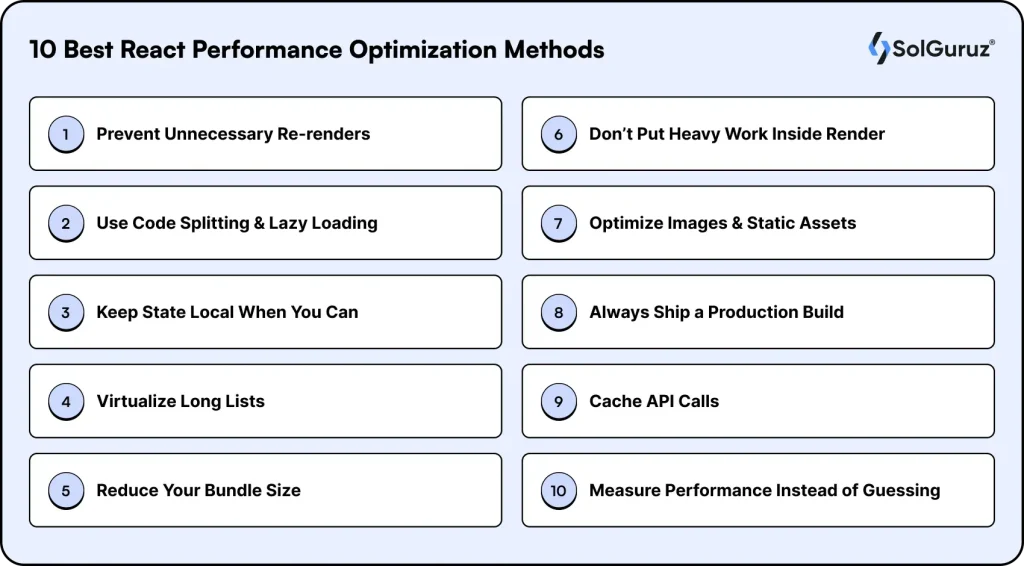
Here are the most practical methods that will help you optimize without rebuilding everything.
1. Prevent Unnecessary Re-renders
Many React performance issues arise when there is frequent re-rendering.
There are chances that the parent updates, and every child refreshes with it. Or some new function is created on each render, and React treats it as a change.
For this, you can use tools like React. memo, useCallback, and useMemo.
It will help you control when components actually need to update. The goal is to stop React from doing anything that doesn’t contribute.
2. Use Code Splitting & Lazy Loading
Most slow React apps have one thing in common. They try to load everything up front. But users don’t need a lot of options on the first page load.
For this, you can use code splitting and lazy loading. It will help you show what’s needed at the moment.
It’s like opening a book. You don’t read all 500 pages at once. You start with page one. This simple shift dramatically reduces initial load time and makes the app feel responsive from the first interaction.
3. Keep State Local When You Can
Global state sounds convenient until it starts forcing half the app to re-render. This happens more often than teams realize. One small change in Context or Redux triggers updates everywhere.
A better rule of thumb: only lift state when it genuinely needs to be shared.
Everything else should live as close to the component as possible.
Smaller state boundaries mean fewer unnecessary updates. And that alone can clean up a surprising amount of performance noise.
4. Virtualize Long Lists
Every React developer has tried rendering a long list and instantly felt the browser struggle. That’s because React tries to paint every single item. Even the ones not visible yet.
List virtualization fixes this by rendering only what the user can currently see. The rest loads as they scroll.
Also, if your product handles multiple data sets, virtualization is one of the biggest performance gains you can achieve.
5. Reduce Your Bundle Size
Before your React code even runs, the browser needs to download and parse your bundle. If that bundle is bloated, everything feels slow. No matter how optimized your components are.
Running a bundle analyzer often reveals surprising culprits. Sometimes, a heavy charting library is used in one place, or old code fragments are left in place. Trimming this down improves performance across the board.
6. Don’t Put Heavy Work Inside Render
Your render cycle should be lightweight. If your component recalculates a huge list or runs expensive logic each time it updates, the UI will lag.
The fix is simple: move heavy work outside the render path or memoize it. For cases like typing or scrolling, debouncing ensures React does not update on every keystroke.
7. Optimize Images & Static Assets
It’s common to obsess over JavaScript optimization. But many devs overlook that the largest files on the page are often images.
Heavy PNGs and uncompressed assets slow everything down (especially on mobile).
It is best to switch to modern formats like WebP/AVIF. And keep the images in the correct sizes. This will dramatically improve loading speed.
Also, if you can add a CDN, you’ll see the difference instantly.
8. Always Ship a Production Build
Many developers forget this, but the React development build includes extra checks and warnings that intentionally slow things down.
Running in production mode removes that overhead and applies optimizations like minification and tree shaking.
It’s one of the easiest yet most important steps your app should never ship in development mode.
9. Cache API Calls
If users revisit the same screen and your app refetches data from scratch every time, the experience feels unnecessarily slow. Tools like React Query or SWR help you cache responses so the UI loads instantly and updates quietly in the background.
It makes the whole app feel more responsive without changing your API logic.
10. Measure Performance Instead of Guessing
Optimizing blindly is where most dev teams lose hours. React and browsers provide great tools like React Profiler, Lighthouse, and performance timelines. It shows you exactly what’s slowing down your app.
When you measure first, you fix the right things instead of poking around in the dark.
Want Us to Optimize Your React App?
The methods I shared above should help you optimize React performance.
But if you want to get it done fast, then you will need help from an experienced team (like ours at SolGuruz).
We have actually helped many startups optimize their React performance within the initial weeks.
Get in touch with us for a quick audit or help implementing the improvements. Send over your app details, and we’ll guide you through what needs to be optimized.
FAQs
1. How do I figure out what's slowing my app down?
Start with the React Profiler. It shows which components re-render more than they should. Then run a Lighthouse audit to see bundle size, asset issues, and overall performance. These two tools alone uncover most bottlenecks.
2. Is caching necessary for every React project?
Not always, but if your app fetches the same data frequently or shows loading states for repeated screens, caching tools like React Query or SWR can make a huge difference. They keep the UI fast and reduce network calls.
3. How often should I worry about performance?
Not every day, but not 'once a year' either. A quick check after every major release keeps issues small and manageable rather than turning into user complaints later.
4. When is list virtualization actually needed?
Rendering everything at once immediately slows the UI. Virtualization makes the list feel smooth without changing the data.
5. Why does my React app feel slow even though 'React is fast'?
Because the slowdown usually isn't React itself. It's the small things around it. Too many re-renders, a big bundle, heavy images, or a state living in the wrong place. These issues stack up over time until the app starts feeling sluggish.
From Insight to Action
Insights define intent. Execution defines results. Understand how we deliver with structure, collaborate through partnerships, and how our guidebooks help leaders make better product decisions.
 How we Work
Optimize Your React Performance Quickly
Get experienced developers who know how to optimize React and deliver on time.

Strict NDA

Trusted by Startups & Enterprises Worldwide

Flexible Engagement Models

1 Week Risk-Free Trial
Give us a call now!

+1 (724) 577-7737