Why Migrate to Headless WordPress + NextJS? Performance, SEO Real Benefits Explained (2026)
Headless WordPress with NextJS gives you WordPress’s familiar content editor with a NextJS frontend that loads in milliseconds, scores 95+ on Core Web Vitals, and ranks better on Google. This guide breaks down the real performance and SEO gains – and whether migration makes sense for your site.

Summarise with AI


Quick Answer: What is Headless WordPress with NextJS?
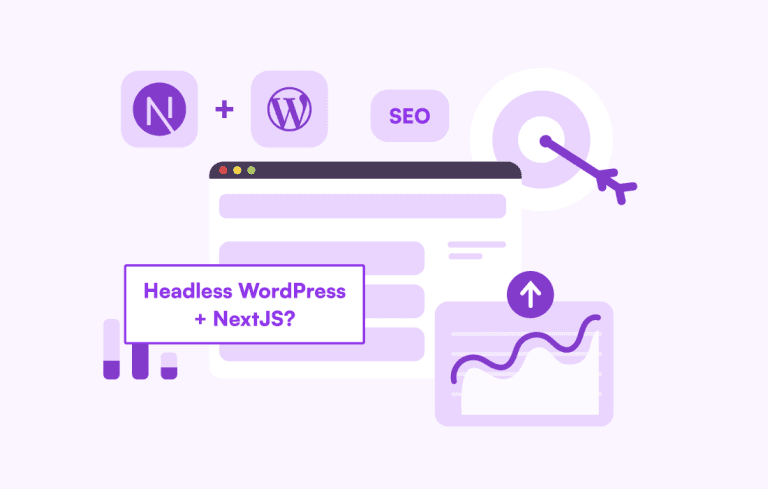
Headless WordPress + NextJS means WordPress handles your content management (drafts, publishing, media, SEO plugins) while NextJS serves as your frontend – generating lightning-fast, statically pre-rendered pages. The two communicate via the WordPress REST API or WPGraphQL.
The result: a site that loads in under a second, scores 90+ on Core Web Vitals, and still lets your content team work in the WordPress dashboard they already know.
Let me be straight with you. If your WordPress site is scoring below 60 on PageSpeed Insights, has a Time to First Byte over 1.2 seconds, and relies on a pile of plugins just to function, this post is for you.
Going headless isn’t a silver bullet. But for the right sites, pairing WordPress as a CMS with NextJS as the frontend is one of the most impactful architectural moves you can make in 2026. The performance gains are real. The SEO impact is measurable. And the developer experience is genuinely better.
Here’s everything you need to know to decide if it’s the right move.
Table of Contents
The Problem with Traditional WordPress in 2026
WordPress powers over 43% of the web. That’s remarkable. But that ubiquity comes with a cost: most WordPress sites in 2026 are running a traditional monolithic architecture – themes, plugins, PHP rendering – that was designed for the internet of 2010, not 2026.
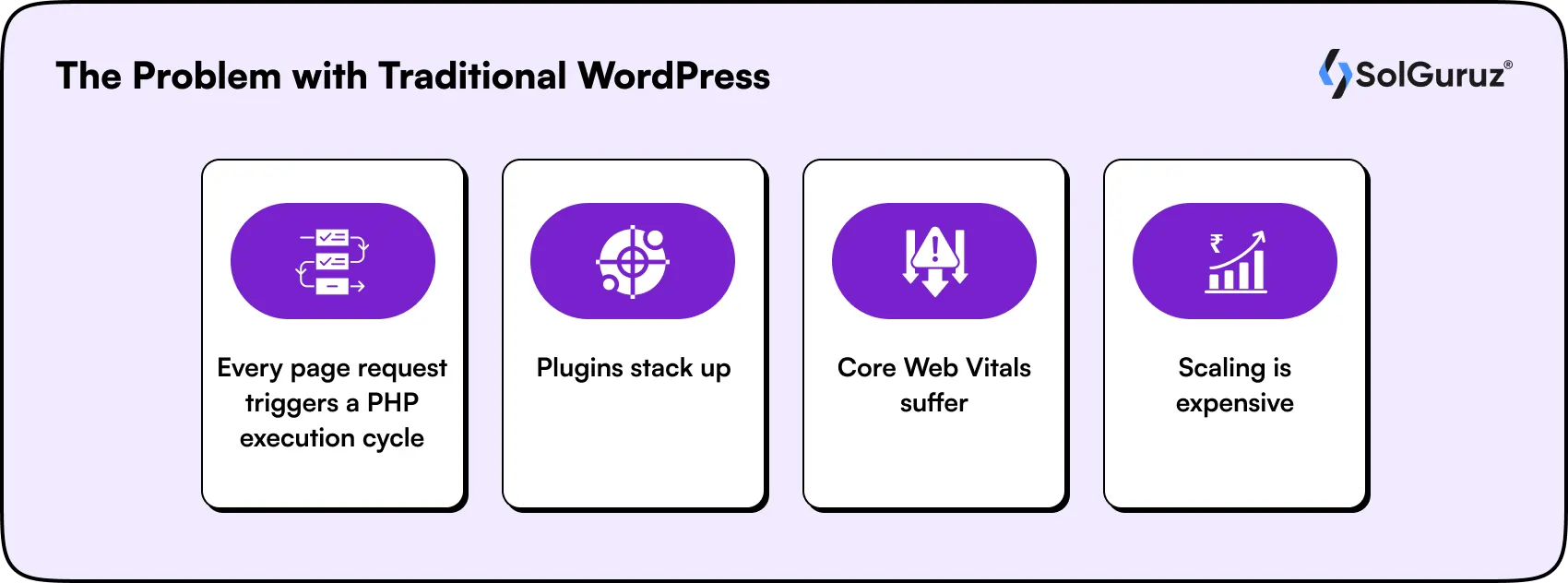
Here’s what that looks like in practice:
- Every page request triggers a PHP execution cycle that queries the database, assembles the HTML, and sends it to the browser. Even with caching plugins, this is inherently slower than pre-built static pages.
- Plugins stack up. Page builders, SEO plugins, caching layers, security plugins – each one adds JavaScript, CSS, and HTTP requests. A typical WordPress site loads 3-8 MB of assets on the first visit.
- Core Web Vitals suffer. Largest Contentful Paint (LCP) above 2.5 seconds and Cumulative Layout Shift (CLS) above 0.1 are common on plugin-heavy WordPress sites. Both directly hurt your Google rankings.
- Scaling is expensive. Traditional WordPress needs managed hosting (WP Engine, Kinsta) at $30-$300/month just to stay fast. Scale to high traffic and costs jump significantly.
None of this means WordPress is broken. It means the rendering layer is the problem – and that’s exactly what going headless solves.
What Headless WordPress + NextJS Actually Means
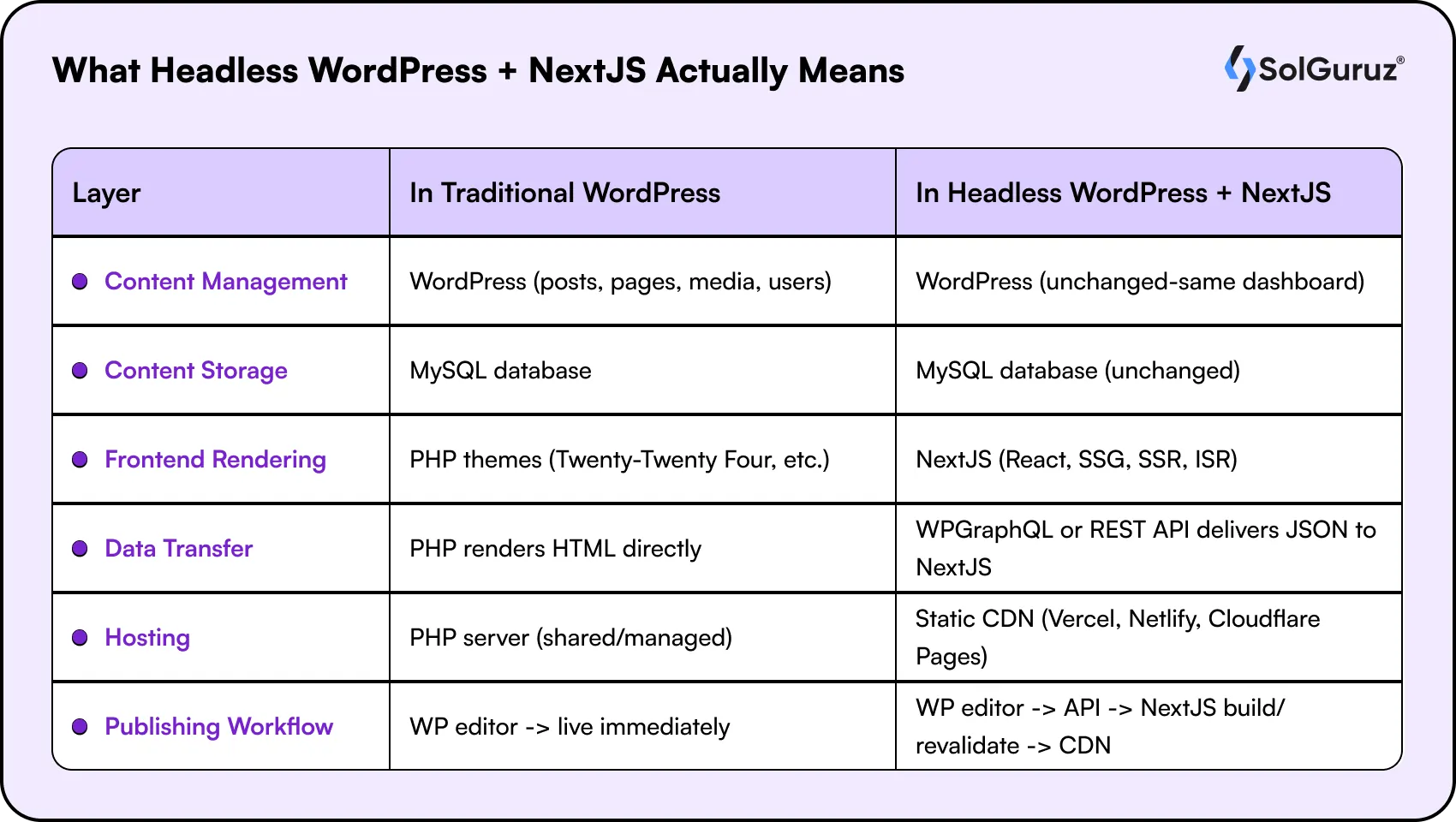
In a traditional WordPress setup, WordPress does everything: it stores your content and renders your pages. In a headless setup, you split those two jobs between two systems. WordPress manages the content, while NextJS handles the frontend experience, a modern approach commonly used in headless CMS development to improve flexibility, performance, and scalability. Let’s check out the table below:
| Layer | In Traditional WordPress | In Headless WordPress + NextJS |
| Content Management | WordPress (posts, pages, media, users) | WordPress (unchanged – same dashboard) |
| Content Storage | MySQL database | MySQL database (unchanged) |
| Frontend Rendering | PHP themes (Twenty-Twenty Four, etc.) | NextJS (React, SSG, SSR, ISR) |
| Data Transfer | PHP renders HTML directly | WPGraphQL or REST API delivers JSON to NextJS |
| Hosting | PHP server (shared/managed) | Static CDN (Vercel, Netlify, Cloudflare Pages) |
| Publishing Workflow | WP editor -> live immediately | WP editor -> API -> NextJS build/revalidate -> CDN |
Your content team sees zero change. They still write posts in Gutenberg, schedule content, manage media, and use Yoast SEO just like before. The change is invisible to them – and transformative for your users.
The Performance Case: Real Numbers
This is where headless WordPress genuinely delivers. Let’s look at how the architecture change affects the metrics that matter.
Time to First Byte (TTFB)
Traditional WordPress: typically 400-1,200ms depending on server and caching setup.
Headless NextJS on Vercel/CDN: 50-150ms. Your HTML is pre-built and served from the edge nearest the user. There’s no PHP execution, no database query, no cache warm-up waiting.
The reason: NextJS Static Site Generation (SSG) pre-renders every page at build time. When a user requests a page, they get a pre-built HTML file from a CDN edge node, which is the fastest possible response.
Largest Contentful Paint (LCP)
LCP measures how long it takes for the largest visible element on your page to render. Google’s threshold for ‘good’ is under 2.5 seconds.
| Setup | Typical LCP | Google Rating |
| WordPress + page builder (Elementor, Divi) | 3.5-6.0s | POOR |
| WordPress + WP Rocket + managed hosting | 1.8-3.0s | NEEDS IMPROVEMENT |
| Headless WordPress + NextJS (Vercel) | 0.8-1.5s | GOOD |
NextJS handles image optimization natively through the next/image component, which auto-serves WebP/AVIF, lazy-loads below-the-fold images, and prevents layout shift with pre-calculated dimensions. That’s a CLS score of near-zero without any additional configuration.
Incremental Static Regeneration (ISR) – The Best of Both Worlds
One concern with static sites is stale content. If you publish a new blog post, does the site need a full rebuild?
This is where NextJS ISR is a genuine technical advantage. You can set a revalidation window (e.g., every 60 seconds) so that NextJS re-generates updated pages in the background without a full rebuild or site downtime. New content goes live within minutes, and the performance of a pre-built static page is preserved.
How ISR Works in Practice
You publish a blog post in WordPress at 9:00 AM. NextJS serves the cached static version to visitors. At 9:01 AM, the first request after the revalidation window triggers a background rebuild of just that page. By 9:02 AM, all visitors see the updated page – still served as fast as a static HTML file.
The SEO Case: What Actually Changes
There’s a common misconception that headless sites hurt SEO because JavaScript content isn’t indexable. That’s outdated thinking, and it doesn’t apply to NextJS.
Here’s why headless WordPress + NextJS is actually an SEO advantage:
1. Pre-Rendered HTML Is Immediately Indexable
With NextJS SSG or SSR, your pages are delivered as complete HTML documents – not JavaScript shells that need to execute before content appears. Google’s crawler sees exactly what your users see, from the first request.
Compare this to a JavaScript-heavy SPA (Single Page Application) where Google has to execute JS, wait for API calls, and then index the rendered content. That extra step introduces indexing delays and uncertainty.
2. Core Web Vitals Are a Direct Ranking Factor
Since Google’s Page Experience update, Core Web Vitals (LCP, INP, CLS) are confirmed ranking signals. Sites with ‘Good’ CWV scores have a measurable ranking advantage over equivalent sites with ‘Needs Improvement’ or ‘Poor’ scores.
Headless WordPress + NextJS consistently hits ‘Good’ across all three metrics when properly implemented. Traditional WordPress sites with plugin stacks consistently struggle with LCP and CLS.
3. Your Yoast / RankMath Data Travels With You
Your existing Yoast SEO or RankMath meta titles, descriptions, canonical URLs, and structured data are stored in WordPress as post metadata. When NextJS fetches content via the API, it pulls this metadata and injects it into the page head correctly. You don’t lose your SEO work when you go headless.
4. Structured Data and Open Graph Are Easier to Control
In a traditional WordPress theme, structured data (Schema.org) and Open Graph tags depend on your plugin and theme working together correctly. In NextJS, you manage these through the Metadata API or next-seo – giving you precise, programmatic control over every page’s SEO output.
5. Faster Sites Get More Crawl Budget Spent on Content
Googlebot has a crawl budget per site. A faster site means the crawler can visit more pages per session. For large content sites (100+ pages), faster TTFB directly translates to more complete indexing.
The Developer Experience Case
Beyond performance and SEO, there’s a real DX (developer experience) argument for going headless that’s worth naming.
- React components instead of PHP templates. Your frontend team works in the tools they prefer – React, TypeScript, Tailwind CSS – without touching PHP or WordPress theme hierarchy.
- Git-based deployments. Vercel or Netlify deploys on every push. Rollbacks are instant. Preview deployments let your team review changes before they go live.
- No plugin conflicts. Every WordPress developer knows the dread of a plugin update breaking the site. With headless, plugins only affect the CMS layer – they can’t break your frontend.
- Independent scaling. Your frontend (NextJS on Vercel) and your backend (WordPress) scale independently. A traffic spike hits the CDN, not your PHP server.
- Component-based UI. Build a design system in React once and use it consistently across every page type. No theme template duplication, no CSS specificity wars.
When Should You NOT Go Headless?
I want to be honest about the downsides. Headless WordPress + NextJS isn’t the right answer for every situation.
| Situation | Headless Worth It? | Why |
| Small brochure site (5-10 pages) | Probably not | Overkill. Managed WordPress hosting is simpler and sufficient. |
| Site maintained by the non-technical content team only | Risky | Preview functionality requires custom setup. Content editors lose the live WP preview button. |
| WooCommerce store with complex checkout | Complex | Headless WooCommerce is doable but significantly more complex. Evaluate carefully. |
| Large content site (100+ pages, blog, documentation) | Yes | Full performance and SEO gains. ISR handles content freshness. CDN scales at near-zero cost. |
| Multi-channel content (web + app + digital signage) | Yes | WordPress is a single content source feeding multiple frontends via API. Big win. |
| Performance-critical marketing site | Yes | Core Web Vitals matter here. Headless + NextJS is the highest-performance option available. |
| SaaS product with a content marketing site | Yes | Separate the marketing site (headless WP + NextJS) from the app. Best of both worlds. |
The Migration Path: What It Actually Involves
If you’re already on WordPress and considering the switch, here’s the realistic migration path:
1. Audit your current WordPress setup. Identify which plugins are critical, which content types exist, and what custom functionality needs to be rebuilt in NextJS.
2. Install WPGraphQL (or configure the REST API). WPGraphQL is the recommended approach. It lets your NextJS frontend fetch exactly the data it needs in a single request, rather than multiple REST endpoints.
3. Build your NextJS frontend. Recreate your page templates as React components. Your design team works in code from this point.
4. Set up Incremental Static Regeneration for your content types. Posts, pages, categories – each gets a revalidation strategy based on how frequently they update.
5. Configure redirects and canonical URLs. WordPress URLs stay the same. Your NextJS frontend mirrors the WordPress permalink structure to preserve SEO equity.
6. Set up a content preview workflow. WordPress’s native preview button needs to be reconfigured to point to your NextJS preview API route. This is non-trivial and needs planning upfront.
7. Test, then deploy to a CDN. Vercel is the natural choice for NextJS hosting – it handles build optimization, ISR, edge functions, and global CDN automatically.
Thinking about migrating? Our NextJS development team has handled this migration path for multiple clients. We’ll scope the complexity based on your existing WordPress setup before a single line of code is written.
Headless WordPress vs. Other Headless CMS Options
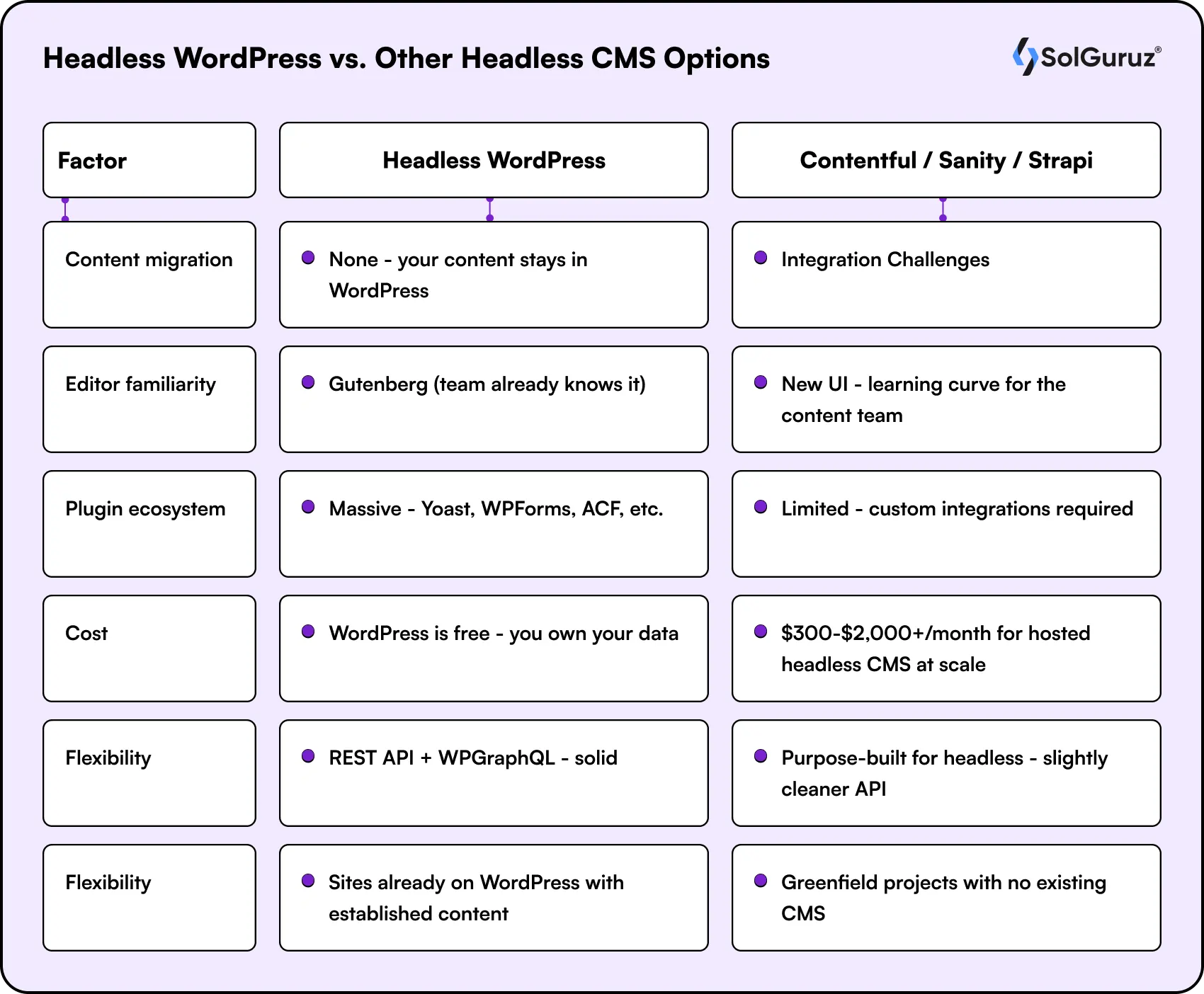
You might be wondering: if I’m going headless anyway, should I just switch to a purpose-built headless CMS like Contentful, Sanity, or Strapi?
The answer depends on your team and existing content.
| Factor | Headless WordPress | Contentful / Sanity / Strapi |
| Content migration | None – your content stays in WordPress | Full migration required – complex and risky |
| Editor familiarity | Gutenberg (team already knows it) | New UI – learning curve for the content team |
| Plugin ecosystem | Massive – Yoast, WPForms, ACF, etc. | Limited – custom integrations required |
| Cost | WordPress is free – you own your data | $300-$2,000+/month for hosted headless CMS at scale |
| Flexibility | REST API + WPGraphQL – solid | Purpose-built for headless – slightly cleaner API |
| Best for | Sites already on WordPress with established content | Greenfield projects with no existing CMS |
If your team is already on WordPress and your content library is significant, going headless with WordPress + Next.js is almost always the better choice than switching to a different CMS.
Wrapping Up
The case for headless WordPress + NextJS in 2026 isn’t hype. It’s measurable.
You get sub-second load times, 90+ Core Web Vitals scores, faster indexing, and a developer workflow that doesn’t involve fighting PHP themes and plugin conflicts. Your content team keeps its WordPress dashboard. Your engineers get React, TypeScript, and modern tooling.
It’s not the right move for a five-page brochure site or a WooCommerce store with complex checkout flows. But for any content-heavy site, marketing platform, or high-traffic web property where performance and SEO matter – this is the architecture that delivers.
If you’re considering the move and want an honest assessment of what it would take for your specific site, that’s exactly the conversation our NextJS team has with clients before anything gets built.
FAQs
1. Does headless WordPress hurt SEO?
No - when done with NextJS. Because NextJS uses Static Site Generation (SSG) or Server-Side Rendering (SSR), pages are delivered as pre-built HTML, not JavaScript that needs to execute before Google can read the content. Your Yoast/RankMath metadata travels via the API and gets injected into the page head correctly. Core Web Vitals improve, which directly benefits rankings.
2. Can my content team still use the WordPress dashboard?
Yes, completely. Going headless changes nothing about the authoring experience. Writers still draft in Gutenberg, publish posts, manage media, and edit pages exactly as before. The only change is that the WordPress frontend theme is replaced by the NextJS frontend, which is invisible to content editors.
3. What is WPGraphQL, and do I need it?
WPGraphQL is a WordPress plugin that adds a GraphQL API to your WordPress install. Instead of fetching multiple REST API endpoints to build a page, your NextJS frontend makes a single GraphQL query requesting exactly the fields it needs. It's more efficient than the REST API for complex pages and is the recommended data layer for headless WordPress + NextJS setups.
4. How long does a WordPress to headless NextJS migration take?
A simple site (under 50 pages, standard post types) typically takes 6-10 weeks. A complex site with custom post types, ACF fields, WooCommerce, or large content libraries can take 4-6 months. The most time-intensive parts are the content preview workflow, custom post type mapping, and WooCommerce integration, if applicable.
5. Can SolGuruz help with headless WordPress + NextJS development?
Yes. We offer NextJS development services and headless CMS development, including headless WordPress migrations. Whether you're building a new site or migrating an existing WordPress property, we scope the project before any work begins and offer a 1-week risk-free trial.

Written by
Lokesh Dudhat
Lokesh Dudhat is the Co-Founder and CTO of SolGuruz, with 15+ years of hands-on experience in full-stack and product engineering. He spent over a decade building native applications across iPhone, iPad, Apple Watch, and Apple TV ecosystems before expanding into backend systems, Angular, Node.js, Python, AI software and solutions, and cloud architecture. As CTO, Lokesh defines and enforces engineering standards, architecture practices, and DevOps maturity across all delivery teams. He is actively involved in system design reviews, scalability planning, code quality frameworks, and platform architecture decisions for complex products. He works closely with product teams and enterprise clients to design resilient, maintainable, and performance-driven systems. His writing focuses on software architecture, headless CMS systems, backend engineering, scalability patterns, and engineering best practices.


From Insight to Action
Insights define intent. Execution defines results. Understand how we deliver with structure, collaborate through partnerships, and how our guidebooks help leaders make better product decisions.
 How we Work
Thinking About Going Headless?
We build NextJS + headless WordPress platforms that load faster, rank better, and scale without breaking.

Strict NDA

Trusted by Startups & Enterprises Worldwide

Flexible Engagement Models

1 Week Risk-Free Trial